> For the complete documentation index, see [llms.txt](https://docs.tradeonnova.net/llms.txt). Markdown versions of documentation pages are available by appending `.md` to page URLs; this page is available as [Markdown](https://docs.tradeonnova.net/afk.md).
# AFK
{% hint style="info" %}
Our AFK module allows you to automatically buy into new PumpFun & Raydium tokens as soon as they launch based on your filters.
{% endhint %}
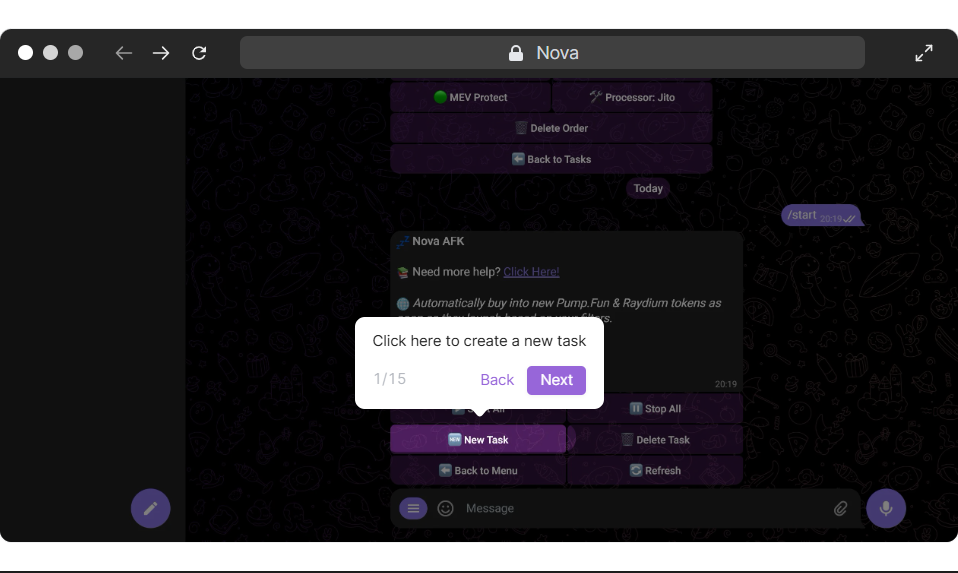
## Interactive Tutorial 👇
| Button | What does it do? | Response from Bot |
| --------------------------------------- | ------------------------------------------------------------------------------------------------------- | ------------------------------------------------------------------------------------------------- |
| 💤 AFK | Opens the AFK mode | N/A |
| 🆕 New Task | Creates a new Task | Opens Raydium or Pump Fun page |
| 💧 Raydium | Creates a Raydium Task | Opens AFK settings |
| 💊 Pump Fun | Creates a Pump Fun Task | Opens AFK settings |
| 💳 Wallet : Name | Allows you to select the wallet you wish to snipe the token with on the AFK mode. | Opens wallet page to select your desired wallet. |
| 💰 Buy Amount | Changes the amount of SOL you wish to put into the token. | Please enter the buy amount. |
| Max Tokens | Sets the maximum amount of tokens to be purchased | Please enter the maximum tokens you want to buy. Example: 5. |
| Reset | Resets all settings | |
| Min Dev Buy (For PumpFun) | Buys into tokens with the right minimum dev buy amount | Please enter the Minimum Dev Buy amount. (in SOL) - Example: 5. |
| Max Dev Buy (For PumpFun) | Buys into tokens with the right maximum dev buy amount | Please enter the Minimum Please enter the Maximum Dev Buy amount. (in SOL) - Example: 5. |
| Minimum Successful Tokens (For PumpFun) | Buys into tokens deployed by a creator with X amount of successful tokens | Please enter the Minimum Dev Successful Tokens. Example: 5. |
| Blacklisted Devs | Allows you to blacklist developer addresses from the AFK task | Enter a list of developer addresses you want to blacklist line by line. |
| Blacklisted Tickers | Allows you to blacklist tickers from AFK task | Enter a list of tickers you want to blacklist line by line. |
| Minimum LP Burn | The minimum amount the liquidity pool of a token has to be burnt before you buy | Please enter the Maximum LP Burn Percentage (in %). Example: 100. |
| Maximum LP Burn | The maximum amount the liquidity pool of a token has to be burnt before you buy | Please enter the Maximum LP Burn Percentage (in %). Example: 100. |
| Minimum Supply | The minimum amount of supply that a token has to have in order for AFK to buy in | Please enter the Minimum Token Supply. You can enter values like 5k, 100k, 1m etc. - Example: 5k. |
| Maximum Supply | The maximum amount of supply that a token has to have in order for AFK to buy in | Please enter the Maximum Market Cap. You can enter values like 5k, 100k, 1m etc. - Example: 5k. |
| Minimum Supply | The minimum market cap a token must have before purchasing | Please enter the Minimum Market Cap. You can enter values like 5k, 100k, 1m etc. - Example: 5k. |
| Maximum Supply | The maximum market cap a token must have before purchasing | Please enter the Maximum Market Cap. You can enter values like 5k, 100k, 1m etc. - Example: 5k. |
| Minimum Top 10 | The minimum percentage of holding in the top ten holders for any given token | Please enter the Minimum Percentage in the Top 10 Holders (in %). Example: 25. |
| Maximum Top 10 | The maximum percentage of holding in the top ten holders for any given token | Please enter the Maximum Percentage in the Top 10 Holders (in %). Example: 25. |
| 💦 Buy Slippage | Changes the amount of Slippage you wish to use. | Enter the new Slippage amount. |
| ⛽ Buy/Sell Fee | Changes the amount for your buying/selling fee on the snipe. | Enter the new Buy Fee. |
| ⛽ Buy/Sell Tip | Changes the amount for the buy/sell tip you wish to use to speed up this snipe. | Enter the new Buy Tip |
| 💸 TP & SL | [TP & SL](https://docs.tradeonnova.io/configuration/tp-and-sl) | [TP & SL](https://docs.tradeonnova.io/configuration/tp-and-sl) |
| 💸 🔴Stopped | Indicates that the snipe is currently not active, needs to be pressed to turn snipe on. | N/A |
| 🟢Running | Indicates the snipe is now running. | N/A |
| 🛠️ Buy / Sell Processor | Changes [processor ](https://docs.tradeonnova.io/configuration/settings/processor)to use for each snipe | Toggles through different processors |
| 🟢 MEV Protect | Turns MEV Protect on for Buy/Sell by changing processor. | Enables/Disables MEV Protect |
| ⬅️ Back to Tasks | Takes you back to the sniper module. | N/A |
| 🔴 Task NAME | Takes you to the sniper task's specific settings page. | N/A |
| 🗑️ Delete Task | Deletes the current task you are viewing. | N/A |